Information on Service 'ROME/REA preview maker'
The ROME/REA (Robotic Observations of Microlensing Events/Reactive
Event Assessment) Survey was a Key Project at Las Cumbres Observatory
(hereafter LCO) which continuously monitored 20 selected fields (3.76
sq.deg.) in the Galactic Bulge throughout their seasonal visibility
window over a three-year period, between March 2017 and March 2020.
Observations were made in three optical passbands (SDSS g', r', i'),
and LCO's multi-site telescope network enabled the survey to achieve a
typical cadence of ~10hrs in i' and ~15hrs in g' and r'. In
addition, intervals of higher cadence (<1hr) data were obtained during
monitoring of key microlensing events within the fields. This
catalog includes the full timeseries photometry for all ~8 million
stars, down to a limiting magnitude of i~18mag.
For a list of all services and tables belonging to this service's
resource, see Information on resource 'ROME/REA Timeseries Photometry Data Release 1'
Service Documentation
As a short example for how to explore this data using VO protocols,
try this:
Open TOPCAT and it's VO/TAP window. Select "GAVO DC TAP" from
the server selection and hit "use service".
We would like to find "unusual" time series; perhaps ones with
a large range. To get a feeling for what "unusual" might mean,
just fetch a few metadata rows like with a TAP query like this:
SELECT TOP 7000 * FROM rome.time_series
WHERE np_i>100 AND np_g>100
Do a plane plot of that data, and ask TOPCAT to plot
mag_i_max-mag_i_min against mag_g_max-mag_g_min.
When you open a table view, you can inspect the metadata
for the time series when clicking on a point in the plot.
Let's inspect the actual data: In TOPCAT's main window,
do Views/Activation Actions. If you check "Plot Table",
TOPCAT will download and plot the time series; it will only
plot the first lightcurve, though. To get all bands, at this point you
have to manually fetch accref from the table and use File -> Load Table.
Sorry about this.
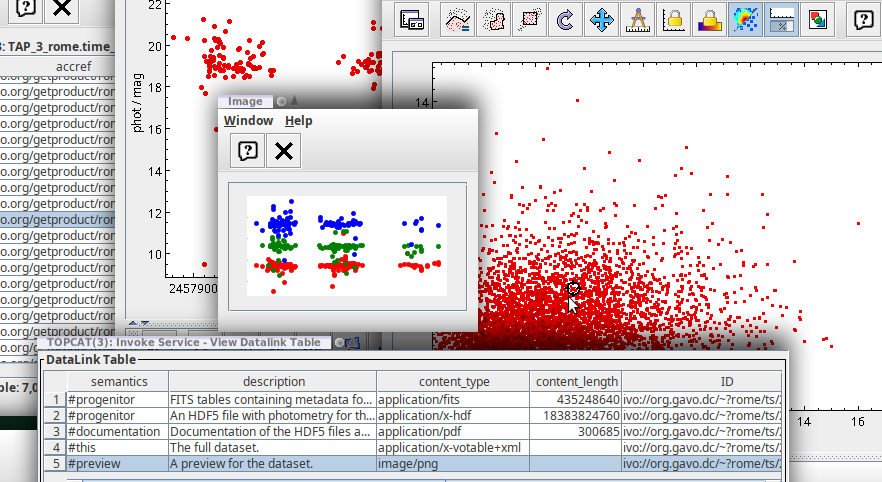
Using datalink, you can also view three-band previews with one click on
a plot point. To configure this, check "Invoke Service" in the
Activation Actions, then use "Invoke now". In the dialog that
pops up then, select the row with #preview and check Auto-Invoke.
You will then see a light rendition of the light curves in (up to)
three colours.
Your desktop could then look somewhat like this:
Overview
You can access this service using:
-
qp --
an interface that uses the last path element to query the column rome_id in the underlying table.
Coverage

Intervals of messenger energies reflected in this resource: 1.44168 3.44401 eV
Time covered by this resource's data: 2017.26 2019.7
This resource is not (directly) published.
This can mean that it was deemed too unimportant, for internal
use only, or is just a helper for a published service.
Equally likely, however,
it is under development, abandoned in development or otherwise
unfinished. Exercise some caution.
Other services provided on the underlying data
include:
Copyright, License, Acknowledgements
Citation Info
VOResource XML (that's something exclusively for VO nerds)
![[Operator logo]](/static/img/logo_medium.png)
![[CC-BY-SA]](/static/img/ccbysa.png)