![[Operator logo]](/static/img/logo_medium.png)
Metadata
Identifier
Cite this
Description
Keywords
Creator
Created
Data updated
Metadata updated
Rights
The ROME/REA data is licensed under the Creative Commons Attribution Share-Alike 4.0 License
![[CC-BY-SA]](/static/img/ccbysa.png)
The ROME/REA data is licensed under the Creative Commons Attribution Share-Alike 4.0 License
Table Description:
This table is not available for ADQL queries and through the TAP endpoint.
Resource Description:
For a list of all services and tables belonging to this table's resource, see Information on resource 'ROME/REA Timeseries Photometry Data Release 1'
Resource Reference URL: Resource info
This table has an associated publication. If you use data from it, it may be appropriate to reference 2024PASP..136f4501S (ADS BibTeX entry for the publication) either in addition to or instead of the service reference.
To cite the table as such, we suggest the following BibTeX entry:
@MISC{vo:rome_raw_series,
  year=2024,
  title={{ROME}/{REA} Timeseries Photometry Data Release 1},
  author={Street, R.A. and Bachelet, E. and Tsapras, Y. and Hundertmark, M.P.G. and Bozza, V. and Bramich, D.M. and Cassan, A. and Dominik, M. and Figuera Jaimes, R. and Horne, K. and Mao, S. and Saha, A. and Wambsganss, J. and Zang, W.},
  url={http://dc.g-vo.org/tableinfo/rome.raw_series},
  howpublished={{VO} resource provided by the {GAVO} Data Center}
}
The ROME/REA data is licensed under the Creative Commons Attribution Share-Alike 4.0 License
As a short example for how to explore this data using VO protocols, try this:
Open TOPCAT and it's VO/TAP window. Select "GAVO DC TAP" from the server selection and hit "use service".
We would like to find "unusual" time series; perhaps ones with a large range. To get a feeling for what "unusual" might mean, just fetch a few metadata rows like with a TAP query like this:
SELECT TOP 7000 * FROM rome.time_series
WHERE np_i>100 AND np_g>100
Do a plane plot of that data, and ask TOPCAT to plot mag_i_max-mag_i_min against mag_g_max-mag_g_min.
When you open a table view, you can inspect the metadata for the time series when clicking on a point in the plot.
Let's inspect the actual data: In TOPCAT's main window, do Views/Activation Actions. If you check "Plot Table", TOPCAT will download and plot the time series; it will only plot the first lightcurve, though. To get all bands, at this point you have to manually fetch accref from the table and use File -> Load Table. Sorry about this.
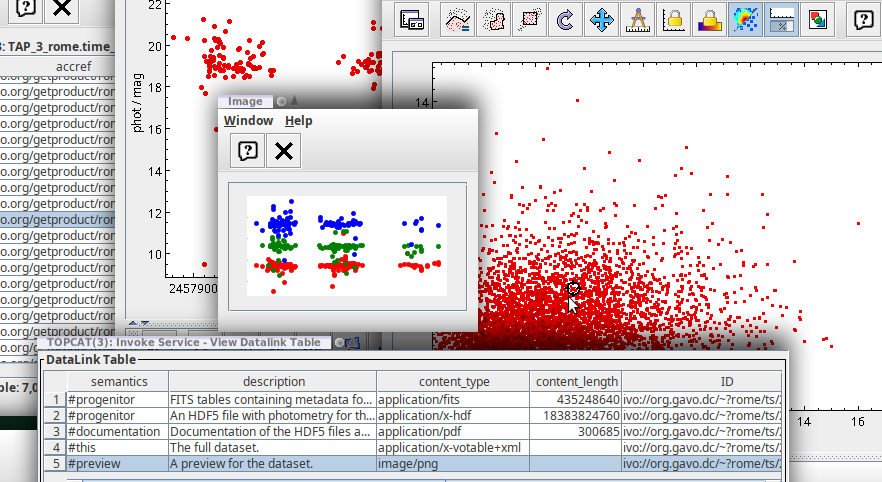
Using datalink, you can also view three-band previews with one click on a plot point. To configure this, check "Invoke Service" in the Activation Actions, then use "Invoke now". In the dialog that pops up then, select the row with #preview and check Auto-Invoke. You will then see a light rendition of the light curves in (up to) three colours.
Your desktop could then look somewhat like this:
Sorted by DB column index. [Sort alphabetically]
| Name | Table Head | Description | Unit | UCD |
|---|---|---|---|---|
| accref | Product key | Access key for the data | N/A | meta.ref.url |
| owner | Owner | Owner of the data | N/A | N/A |
| embargo | Embargo ends | Date the data will become/became public | yr | N/A |
| mime | Type | MIME type of the file served | N/A | meta.code.mime |
| accsize | File size | Size of the data in bytes | byte | VOX:Image_FileSize |
| ssa_location | Location | ICRS location of aperture center | deg | pos.eq |
| ssa_region | Coverage | Rough coverage based on location and aperture. | N/A | pos.outline;obs.field |
| rome_id | Id | Local unique identifier for this object within ROME/REA: field*10'000'000+quadrant*1'000'000'+quadrant_id | N/A | meta.id;meta.main |
| upstream_name | ROME/REA | Upstream has a field/field_id naming scheme skipping the quadrants. This column can be used to go from our data to upstream's. | N/A | meta.id |
| ra | RA | ICRS right ascension of this object | deg | meta.id;meta.main |
| dec | Dec | ICRS declination of this object | deg | meta.id;meta.main |
| hjd_min | min(T) | Earliest observation represented in the time series | d | time.epoch;stat.min |
| hjd_max | max(T) | Latest observation represented in the time series | d | time.epoch;stat.max |
| ssa_dateObs | Mean Date | Mean MJD of observations | d | time.epoch |
| mag_i_min | min(mag_i) | Minimal (brightest) magnitude measured in the SDSS i' band. | mag | phot.mag;em.opt.i;stat.min |
| mag_i_max | max(mag_i) | Maximal (faintest) magnitude measured the SDSS i' band. | mag | phot.mag;em.opt.i;stat.max |
| mag_i_mean | <mag_i> | Mean magnitude of the SDSS i' lightcurve. | mag | phot.mag;em.opt.i;stat.mean |
| np_i | N(i) | Number of measurements in the SDSS i' lightcurve. | N/A | meta.number;obs |
| mag_g_min | min(mag_g) | Minimal (brightest) magnitude measured in the SDSS g' band. | mag | phot.mag;em.opt.v;stat.min |
| mag_g_max | max(mag_g) | Maximal (faintest) magnitude measured the SDSS g' band. | mag | phot.mag;em.opt.v;stat.max |
| mag_g_mean | <mag_g> | Mean magnitude of the SDSS g' lightcurve. | mag | phot.mag;em.opt.v;stat.mean |
| np_g | N(g) | Number of measurements in the SDSS g' lightcurve. | N/A | meta.number;obs |
| mag_r_min | min(mag_r) | Minimal (brightest) magnitude measured in the SDSS r' band. | mag | phot.mag;em.opt.r;stat.min |
| mag_r_max | max(mag_r) | Maximal (faintest) magnitude measured the SDSS r' band. | mag | phot.mag;em.opt.r;stat.max |
| mag_r_mean | <mag_r> | Mean magnitude of the SDSS r' lightcurve. | mag | phot.mag;em.opt.r;stat.mean |
| np_r | N(r) | Number of measurements in the SDSS r' lightcurve. | N/A | meta.number;obs |
| field | Field | ROME field the object was observed in | N/A | meta.id;obs.field |
| quadrant | Quadrant | Quadrant of this object (for purely technical reasons, ROME has split each field into four quadrants). | N/A | meta.id;obs.field |
| quadrant_id | Id(Q) | Identifier for this object within its quadrant | N/A | meta.id |
| gaia_source_id | DR3 source_id | Gaia DR3 source_id for this object | N/A | meta.id.cross |
Columns that are parts of indices are marked like this.
The following services may use the data contained in this table:
VO nerds may sometimes need VOResource XML for this table.